WebMCP for podcasts and YouTube channels: now agent-ready
PodHood libraries now ship WebMCP: eight in-page tools that let AI agents search, filter, read, and play your episodes on the page a listener is viewing.
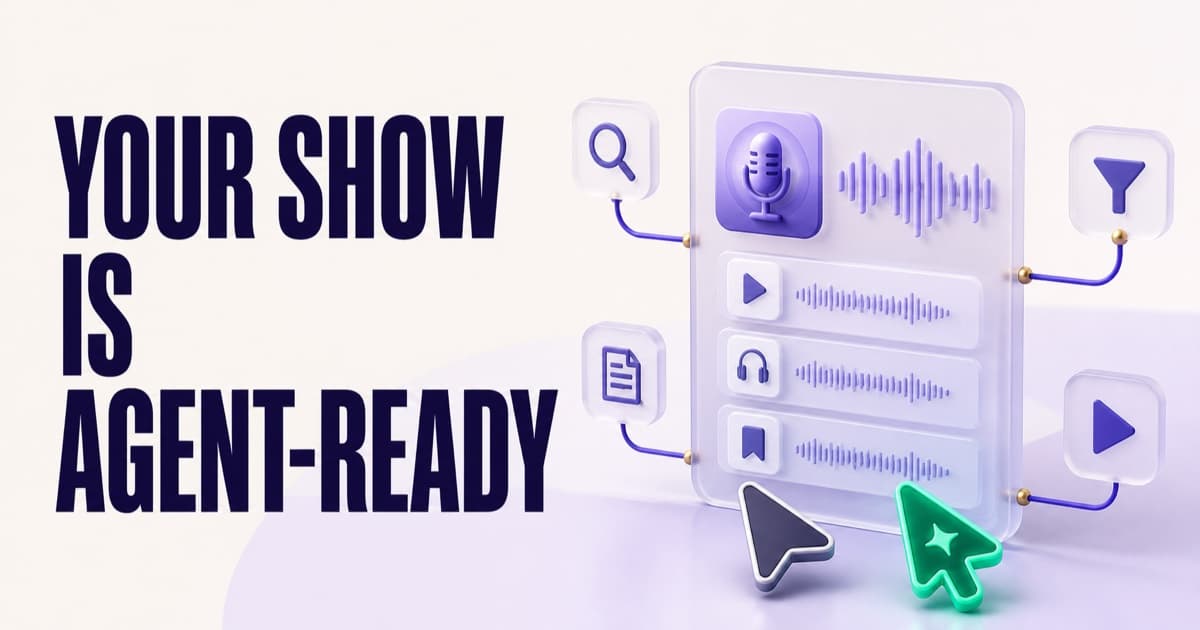
Every PodHood library now ships WebMCP, the emerging standard that lets a website hand tools directly to an AI agent visiting the page. When someone browses your show with an agent alongside — in the ChatGPT desktop app, or in Chrome's WebMCP origin trial — the agent discovers eight tools registered by your pages: it can search your whole catalog by meaning, filter the episode list the person is actually looking at, open an episode, read and search the transcript, and start playback at an exact moment. The tools work because PodHood indexes every episode into a structured Brief — chapters, key moments, speakers, entities, a word-aligned transcript — not just a text dump. Everything is read-only, branded as your show rather than PodHood, and works on custom domains. Connect a YouTube channel or podcast RSS feed and it's on every page, no code required. See it live on aiengineer.podhood.com.
Picture a listener with an AI agent at their side — the ChatGPT desktop app, say — landing on your show's site. They ask: "What does this show say about evals? Play me the best bit." Until now, the agent's options were bad: scrape the page and guess, or leave your site entirely and answer from stale training data.
As of today, on every PodHood library, there's a third option: your pages hand the agent tools. It searches your catalog by meaning, narrows the episode list the person is looking at, opens the episode, finds the exact sentence in the transcript, and starts playback at that second — in the browser tab the human is watching. That's WebMCP, and it's live today on every published PodHood library — whether your show is a podcast feed or a YouTube channel — with OpenAI's WebMCP Challenge week feeling like the right moment to ship it.
What is WebMCP?
WebMCP is a proposed web standard that lets a webpage register tools an AI agent can discover and call while visiting that page. Drafted by engineers from Microsoft and Google in the W3C Web Machine Learning Community Group, it now ships in the ChatGPT desktop app and as a Chrome origin trial. The page declares each tool through the browser's document.modelContext API: a name, a description, an input schema, and a function that runs in the page itself. (Early write-ups reference navigator.modelContext; the current draft and both shipping implementations use document.modelContext.)
The difference from everything that came before is where the agent stands. MCP connects an agent to your content from the outside, like an API client. WebMCP assumes the agent is already on the page, next to a human, sharing the same live view — so its tools can read what's on screen and drive what's on screen, with no scraping, no guessing at selectors, and no separate login: the tools run with exactly what the page itself can see.
What can an agent do on your podcast or YouTube library?
Every PodHood library registers two tool surfaces — one on the episode list, one on each episode page — eight tools in all:
| Surface | Tool | What the agent can do |
|---|---|---|
| Episode list | search_episodes | Search the whole catalog by meaning or keyword; answers come back with timestamped citation links. |
| Episode list | filter_episodes | Apply the page's topic, person, mention, collection, and year filters — the list and URL the visitor sees change. |
| Episode list | list_episodes | Read back exactly the episodes the page is showing, in order, with ids. |
| Episode list | open_episode | Navigate the visitor's browser to one episode's page. |
| Episode page | read_episode | Read the summary, speakers, and the chapter & key-moment outline with timestamps. |
| Episode page | search_transcript | Find exact text in the transcript and highlight it in the panel the person is looking at. |
| Episode page | read_transcript | Read a speaker-labelled, timestamped window of the transcript — a chapter, or any time range. |
| Episode page | play_moment | Seek the player to a moment and start playback — the person hears it, and the word-synced transcript follows. |
Three properties matter as much as the tools themselves:
- Everything is read-only. The only state an agent can touch is view state the visitor already controls — filters, highlights, the playhead — all visible and reversible. Nothing is created, edited, or deleted.
- The tools speak as your show, not as PodHood. A visiting agent on a white-labelled library sees "Search this show's episodes," never a platform name — the same rule our custom-domain pages follow everywhere else.
- Citations land on the domain the visitor is on. An agent searching a library served at your own domain gets citation links on your domain — what it quotes is what the listener can click.
Why WebMCP needs more than a transcript
Here's the part that decides whether an agent on your site is useful or just present: the tools are only as good as the structure underneath them.
Publish a transcript page and you've given an agent exactly one move — read thousands of words and hope the answer is in the window it happened to load. None of the eight tools above can be built on a text dump:
search_episodesanswers by meaning because every episode is semantically indexed, not string-matched.filter_episodesworks because episodes carry disambiguated topics, people, and mentioned companies and products — a knowledge graph, so "the Anthropic talks" is a filter, not a guess.read_episodereturns an outline because indexing produced chapters and key moments with timestamps, and diarized speakers with their share of the conversation.play_momentcan start playback at the exact sentence because the transcript is word-aligned to the audio — a transcript that doesn't know its own timestamps can't take anyone anywhere.
This is PodHood's core bet, and it predates WebMCP: indexing decomposes every episode into a structured Brief — summary, chapters, key moments, speakers, entities and topics, word-level transcript — and publishes it as pages built for retrieval. WebMCP is the newest consumer of that structure, after search engines and answer engines. When the next agent surface arrives, the same structure will feed that too. Transcription is one input; the product is everything an agent — or a listener — can do because the structure exists.
See it live: the AI Engineer channel
Our customer AI Engineer — the conference channel whose talks from OpenAI, Anthropic, Sourcegraph, Snowflake and hundreds of other teams live on YouTube — runs their searchable library on PodHood, and it makes a fitting demo: an audience of AI engineers, browsing an agent-ready archive about building agents. Their source is a YouTube channel; a podcast feed lands in exactly the same place.
Open aiengineer.podhood.com in a WebMCP-capable agent and try the arc end to end:
- "What do these talks say about agent evals?" — the agent calls
search_episodesand answers from the catalog, with timestamped citations into specific talks. - "Show me just the security talks." —
filter_episodesnarrows the list on screen; the visitor watches the page change, and the URL now captures that view. - "Open the one about agent harnesses." —
open_episodenavigates to the episode page, where the second tool surface takes over. - "Where do they explain why the harness fails?" —
search_transcripthighlights the matches in the transcript panel and returns each one with a citation link. - "Play that part." —
play_momentseeks the player, and the room hears the answer in the speaker's own voice.
No step involved scraping, and no step took the visitor away from the site. The human and the agent worked on the same page — which is precisely the experience WebMCP exists to make possible.
How is this different from PodHood's MCP server?
It's a third agent surface, not a replacement. PodHood already exposes every published catalog to agents that connect from outside over MCP — that's the surface our GEO playbook covers. Here's how they divide the work:
| MCP server | WebMCP (new) | |
|---|---|---|
| Where the agent is | Connected from outside (Claude, ChatGPT connectors) | Standing on your page, next to a human |
| Setup for the agent | A connector configuration | None — it discovers the tools by visiting |
| What it can reach | Your whole published catalog | The catalog plus the live page state |
| What it can do | Query and cite | Query, cite, and drive the view the person sees |
| Best at | Research without a browser | Assisting a human who's browsing your show right now |
Both surfaces report into the same place: the Studio's Agents analytics counts WebMCP tool calls beside your MCP traffic, verbatim questions included — the "see who finds your show" loop, now covering agents that arrive with your visitors.
How do I try it?
If you're a creator, there is nothing to set up. WebMCP tools are part of every published PodHood library — connect a YouTube channel or a podcast RSS feed and every episode becomes a structured page that carries the agent surface, custom domains included. Agents without WebMCP support see your normal pages; nothing degrades.
To experience it as a visitor, you currently need one of the two client paths:
- ChatGPT desktop app — browsing with its newest models discovers WebMCP tools on the page natively.
- Chrome — WebMCP is an origin trial; PodHood registers its origins for the trial, so
document.modelContextis live on library pages without any flags.
Support is young and moving fast — that's what makes this week interesting.
Why now: the OpenAI WebMCP Challenge
OpenAI, with Google Chrome, Cloudflare, Shopify, Vercel, Render, and Netlify, is running the WebMCP Challenge — a 10-day hackathon (August 25 – September 3, 2026) for WebMCP-powered web apps, judged on WebMCP leverage, execution, potential impact, and creativity, with $35,000 in cash prizes plus partner awards.
If you're building an entry, aiengineer.podhood.com is a production WebMCP deployment you can study today: tool descriptions that tell the agent what visibly changes for the human, read-only annotations, show-authored text flagged as untrusted content, and a settle-before-report pattern so the agent never describes a page the visitor has already left.
And if you make a podcast or run a talk-content YouTube channel, the challenge is a preview of how a growing slice of your audience will arrive: with an agent alongside. The open web is becoming a place agents can act, not just read — and the shows agents can actually help people into will be the ones whose archives are structured for it, not the ones with the longest transcript pages.
Your show can be one of them without writing a line of code: connect your channel, and your library — searchable by listeners, crawlable by Google, citable by answer engines, queryable over MCP — now hands its tools to every agent that walks in the door.
常见问题
- What is WebMCP?
- WebMCP is a proposed W3C web standard, drafted by engineers from Microsoft and Google and now shipping in the ChatGPT desktop app and as a Chrome origin trial, that lets a webpage register tools for AI agents through the browser's document.modelContext API. Instead of an agent scraping your page or connecting to a separate server, the page itself declares what an agent can do there — and the agent and the human share the same live view.
- Does WebMCP work for a YouTube channel, or only for podcasts?
- Both, identically. PodHood connects to a YouTube channel or a podcast RSS feed the same way, builds the same structured library from either, and the WebMCP tools ship on every page of it. YouTube itself gives a visiting agent no tools — your PodHood library is where your channel becomes agent-ready. AI Engineer, the live example in this post, is a YouTube channel.
- Do I need to set anything up to make my show agent-ready?
- No. WebMCP tools are part of every published PodHood library — the episode list pages and every episode page — including libraries served on your own custom domain. Connect a YouTube channel or podcast RSS feed and the agent surface ships with your pages automatically.
- Why isn't publishing transcripts enough for AI agents?
- A transcript wall gives an agent one move: read thousands of words and hope. Useful tools need structure underneath — semantic search needs an index, filtering needs episodes tagged with disambiguated topics and people, jumping to a moment needs word-level audio alignment, and an outline needs chapters and key moments. PodHood indexes every episode into that structure (we call it a Brief), which is what the eight tools are built on.
- Which agents and browsers support WebMCP today?
- As of this writing: the ChatGPT desktop app (browsing with its newest models) discovers WebMCP tools natively, and Chrome exposes the API as an origin trial — PodHood registers its origins for the trial, so the tools are live there without any flags. Agents without WebMCP support simply see your normal pages; nothing breaks.
- Can an agent change or delete anything on my site?
- No. All eight tools are read-only. The only things an agent can 'change' are view state the visitor already controls — which filters are applied, what's highlighted in the transcript, where the player is — and each of those is visible, reversible, and flagged in the tool description so the agent knows the person will see it.
- How is WebMCP different from PodHood's MCP server?
- The MCP server answers agents that connect from outside — from a Claude or ChatGPT connector configuration — with your catalog as a queryable backend. WebMCP serves an agent already standing on your page next to a human, so its tools can do the one thing no external connection can: drive the view the person is looking at. The two are complementary, and PodHood ships both.
- What is the OpenAI WebMCP Challenge?
- A 10-day hackathon (August 25 – September 3, 2026) run by OpenAI with Google Chrome, Cloudflare, Shopify, Vercel, Render, and Netlify, inviting builders to ship WebMCP-powered web apps. Entries are judged on how well they leverage WebMCP, execution, potential impact, and creativity, with $35,000 in cash prizes plus partner awards.
PodHood 创始人,关注播客和 YouTube 频道如何在 Google 与 AI 回答中被找到,并把这些发现转化为属于自己的受众。
继续阅读
- Does your podcast need its own website? Why one platform isn't enough
- How to turn podcast episodes into video clips (no camera required)